
Assign Nattugla
First Step
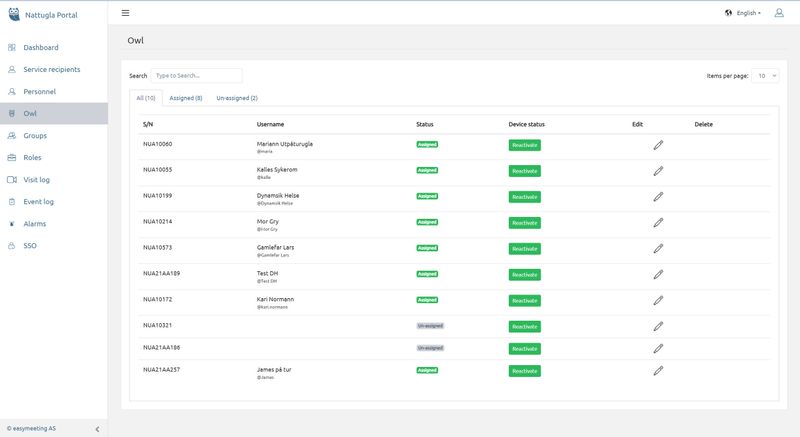
- Click on Owl in the menu to the left
- Click on Edit (Pencil) on the Nattugla you want to assign a Service Recipient-A new window opens.
- If the Nattugla is not activated (DEVICE STATUS), you must also activate the Nattugla.
- In order to be able to assign a Nattugla , a Service Recipient must first be created.
Second Step
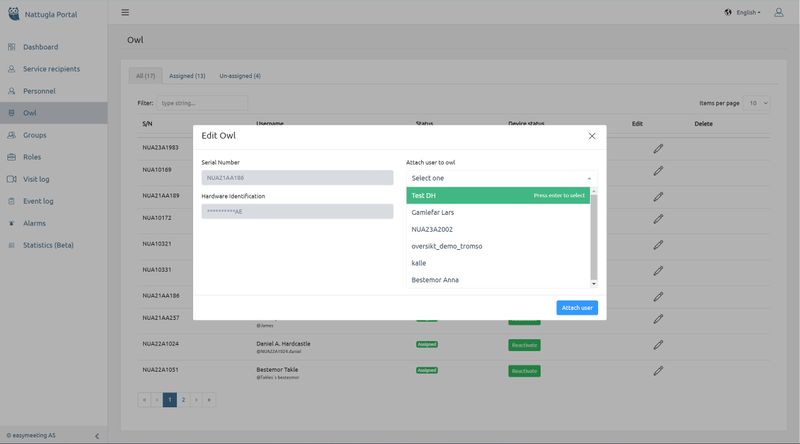
Select a Service Recipient from the drop-down menu on the right. Click Associate User.
The Nattugla is now ready for installation at the service recipient.
Third Step
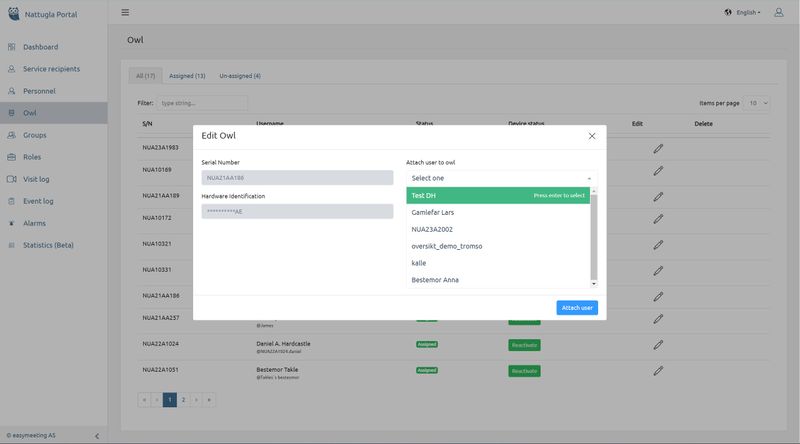
You can easily move a Nattugla to a new Service Recipient by clicking on PENCIL for the assigned Nattugla that you want to move to a new user. New window opens. Click UNLINK.
Nattugla now appears in the overview as not assigned and you can select a new service recipient.
We are here for you
If you can't find the answer to your question, don't worry – we're here to help.
Hepro : + 47 400 04 443
Nattugla : +47 400 04 887